
CRUD App with Mongoose - Create and Read
Lesson Objectives
- Initialize a directory
- Start express
- Create New Route
- Create Create Route
- Connect Express to Mongo
- Create Fruits Model
- Have Create Route Create data in MongoDB
- Create Index Route
- Have Index Route Render All Fruits
- Have Create Route redirect to Index After Fruit Creation
- Create Show Route
- Have Index Page Link to Show Route
- Create show.ejs
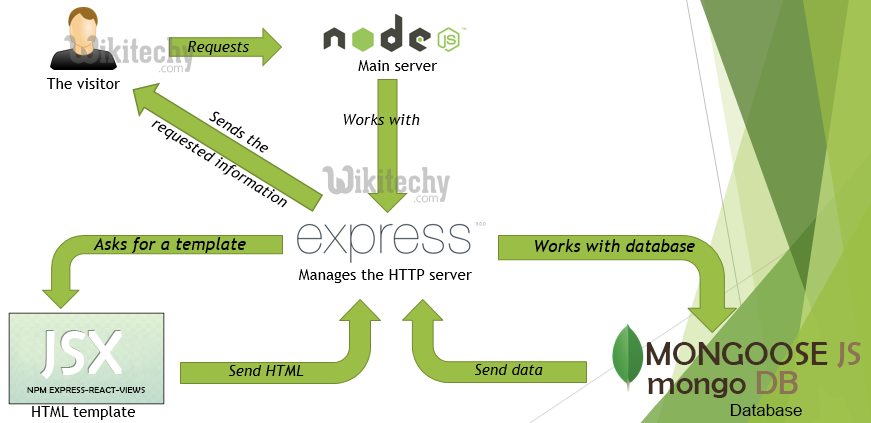
MVC in Action
Initialize a directory
- Create a directory for the app in
student_examplescalledfruits-express-mongooseandcdinto it touch server.jsnpm init -ynpm i express- Edit package.json to have
"main": "server.js",
Start express
const express = require('express');
const app = express();

app.listen(3000, ()=>{
    console.log('listening');
});
Create New Route
app.get('/fruits/new', (req, res)=>{
    res.send('new');
});
mkdir viewsnpm install ejstouch views/new.ejs- Create the view
<!DOCTYPE html>
<html>
    <head>
        <meta charset="utf-8">
        <title></title>
    </head>
    <body>
        <h1>New Fruit page</h1>
        <form action="/fruits" method="POST">
            Name: <input type="text" name="name" /><br/>
            Color: <input type="text" name="color" /><br/>
            Is Ready To Eat: <input type="checkbox" name="readyToEat" /><br/>
            <input type="submit" name="" value="Create Fruit"/>
        </form>
    </body>
</html>
Render the view
app.get('/fruits/new', (req, res)=>{
    res.render('new.ejs');
});
Create Create Route
app.post('/fruits/', (req, res)=>{
    res.send('received');
});- Parse the body in
server.js:
app.use(express.urlencoded({extended:true}));Check to see if req.body is parsed correctly:
app.post('/fruits/', (req, res)=>{
    res.send(req.body);
});
Format data properly
app.post('/fruits/', (req, res)=>{
    if(req.body.readyToEat === 'on'){ //if checked, req.body.readyToEat is set to 'on'
        req.body.readyToEat = true;
    } else { //if not checked, req.body.readyToEat is undefined
        req.body.readyToEat = false;
    }
    res.send(req.body);
});
Connect Express to Mongo
npm install mongoose --save- Inside
server.js:
const mongoose = require('mongoose');

//... and then farther down the file
mongoose.connect(<YOUR ATLAS CONNECTION STRING HERE>, {
    useNewUrlParser: true,
    useCreateIndex: true,
    useUnifiedTopology: true
});
mongoose.connection.once('open', ()=> {
    console.log('connected to mongo');
});
Create Fruits Model
mkdir modelstouch models/fruits.js- Create the
fruitschema
const mongoose = require('mongoose');

const fruitSchema = new mongoose.Schema({
    name:  { type: String, required: true },
    color:  { type: String, required: true },
    readyToEat: Boolean
});

const Fruit = mongoose.model('Fruit', fruitSchema);

module.exports = Fruit;
Have Create Route Create data in MongoDB
Inside server.js:
const Fruit = require('./models/fruits.js');
//... and then farther down the file
app.post('/fruits/', (req, res)=>{
    if (req.body.readyToEat === 'on') { //if checked, req.body.readyToEat is set to 'on'
        req.body.readyToEat = true;
    } else { //if not checked, req.body.readyToEat is undefined
        req.body.readyToEat = false;
    }
    Fruit.create(req.body, (error, createdFruit)=>{
        res.send(createdFruit);
    });
});
Create Index Route
app.get('/fruits', (req, res)=>{
    res.send('index');
});
touch views/index.ejs
<!DOCTYPE html>
<html>
    <head>
        <meta charset="utf-8">
        <title></title>
    </head>
    <body>
        <h1>Fruits index page</h1>
    </body>
</html>
Render the ejs file
app.get('/fruits', (req, res)=>{
    res.render('index.ejs');
});
Have Index Route Render All Fruits
app.get('/fruits', (req, res)=>{
    Fruit.find({}, (error, allFruits)=>{
        res.render('index.ejs', {
            fruits: allFruits
        });
    });
});
Update the ejs file:
<!DOCTYPE html>
<html>
    <head>
        <meta charset="utf-8">
        <title></title>
    </head>
    <body>
        <h1>Fruits index page</h1>
        <ul>
            <% for(let i = 0; i < fruits.length; i++){ %>
                <li>
                    The <%=fruits[i].name; %> is  <%=fruits[i].color; %>.
                    <% if(fruits[i].readyToEat === true){ %>
                        It is ready to eat
                    <% } else { %>
                        It is not ready to eat
                    <% } %>
                </li>
            <% } %>
        </ul>
    </body>
</html>
Add a link to the new page:
<nav>
    <a href="/fruits/new">Create a New Fruit</a>
</nav>
Have Create Route redirect to Index After Fruit Creation
Inside the create route
Fruit.create(req.body, (error, createdFruit)=>{
    console.log(createdFruit);
    res.redirect('/fruits');
});
Create Show Route
app.get('/fruits/:id', (req, res)=>{
    Fruit.findById(req.params.id, (err, foundFruit)=>{
        res.send(foundFruit);
    });
});
Have Index Page Link to Show Route
<li>
    The
    <a href="/fruits/<%=fruits[i].id; %>">
        <%=fruits[i].name; %>
    </a>
    is  <%=fruits[i].color; %>.

    <% if(fruits[i].readyToEat === true){ %>
        It is ready to eat
    <% } else { %>
        It is not ready to eat
    <% } %>
</li>
Create show.ejs
touch views/show.ejs- Add HTML
<!DOCTYPE html>
<html>
    <head>
        <meta charset="utf-8">
        <title></title>
    </head>
    <body>
        <h1>Fruits show page</h1>
        The <%=fruit.name; %> is  <%=fruit.color; %>.
        <% if(fruit.readyToEat === true){ %>
            It is ready to eat
        <% } else { %>
            It is not ready to eat
        <% } %>
        <nav>
            <a href="/fruits">Back to Fruits Index</a>
        </nav>
    </body>
</html>
Render the ejs
app.get('/fruits/:id', (req, res)=>{
    Fruit.findById(req.params.id, (err, foundFruit)=>{
        res.render('show.ejs', {
            fruit: foundFruit
        });
    });
});